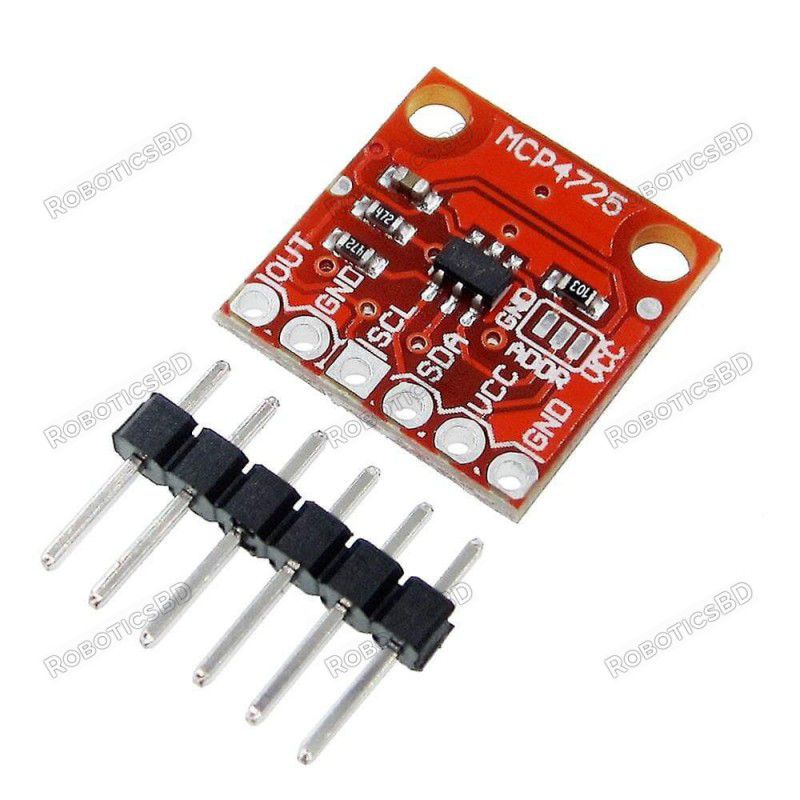
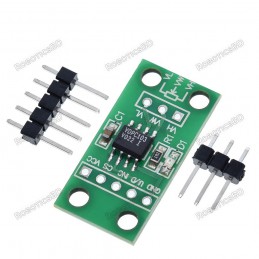
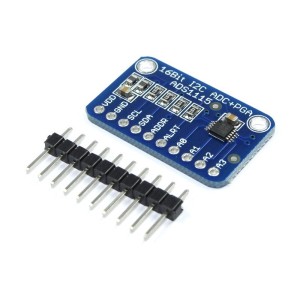
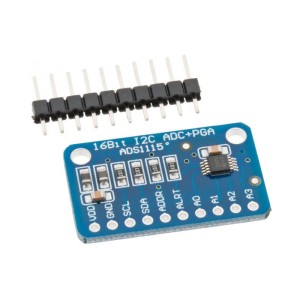
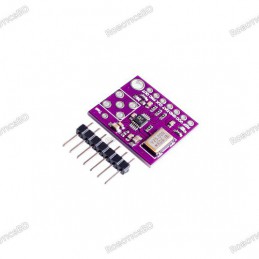
The MCP4725 12-Bit DAC Module is an essential tool for projects requiring accurate, computer-controlled analog voltage output. Unlike PWM-based solutions, this precision DAC provides a true analog output with 12-bit resolution (4096 steps), making it suitable for calibration, waveform generation, and sensor simulation. Its rail-to-rail single channel can source or sink up to 25mA with a typical 6µs settling time. Featuring I2C communication with configurable addresses, it can be easily interfaced with Arduino, ESP32, STM32, and other microcontrollers. The onboard EEPROM allows the DAC to retain its last output value even after power cycles, making it especially useful for persistent calibration voltages. Compact and reliable, the MCP4725 is widely used in audio, instrumentation, and embedded systems. Featured By RoboticsBD.
Product Images are shown for illustrative purposes only and may differ from the actual product.
RoboticsBD RoboticsBD RoboticsBD RoboticsBD RoboticsBD RoboticsBD RoboticsBD RoboticsBD RoboticsBD RoboticsBD
Features:
12-bit digital-to-analog conversion with 4096 steps resolution.
Rail-to-rail single output channel up to 25mA drive current.
6µs typical output settling time for fast response.
Built-in EEPROM for saving output settings across power cycles.
I2C interface with configurable addresses for multiple modules.
Onboard 4.7K pull-up resistors for reliable communication.
Compatible with 3.3V and 5V logic systems.
Flexible header configuration for breadboards and custom wiring.
RoboticsBD RoboticsBD RoboticsBD RoboticsBD RoboticsBD RoboticsBD RoboticsBD RoboticsBD RoboticsBD RoboticsBD
Applications:
Adding true analog output to Arduino and other MCUs.
Signal and waveform generation for testing and development.
Generating calibration voltages in embedded systems.
Audio output and low-frequency waveform applications.
Sensor simulation and control in robotics and automation.
RoboticsBD RoboticsBD RoboticsBD RoboticsBD RoboticsBD RoboticsBD RoboticsBD RoboticsBD RoboticsBD RoboticsBD
| General Specifications |
| Product Type | Digital-to-Analog Converter Module |
| Model | MCP4725 |
| Resolution | 12-bit (4096 steps) |
| Output Channel | 1 (rail-to-rail) |
| Output Drive | Up to 25mA |
| Settling Time | ~6µs |
| Interface | I2C (default address 0x60, configurable) |
| EEPROM | Built-in, stores last output setting |
| Logic Compatibility | 3.3V / 5V |
| Onboard Components | 4.7K pull-up resistors |
| Assembly | Loose headers for flexible configuration |
| Shipment Weight | 0.0019 kg |
| Shipment Dimensions | 3 × 2 × 2 cm |
Please allow 5% measuring deviation due to manual measurement.
RoboticsBD RoboticsBD RoboticsBD RoboticsBD RoboticsBD RoboticsBD RoboticsBD RoboticsBD RoboticsBD RoboticsBD
Documentation:
I2C Interface
Setting I2C Address

The module has an easy to use I2C interface that can be configured to use one of two different I2C addresses if you want to use multiple modules in the same system or if you run into an address conflict with another device.
The address is set by bridging 2 of the 3 small solder pads on top of the module marked ‘ADDR’. The center pin is attached to the A0 address pin on the MCP4725 chip. Next to it are a GND and a VCC pin. A solder blob is used to bridge either the ground or VCC to the A0 pin thus either pulling it to ground via a 10K resistor or tying it to VCC.
As-shipped, the GND and center pin are bridged and so the A0 pin is grounded and the default I2C address is 0x60 as shown in the picture to the right.
If it is desired to change the address, the solder blob can be removed and the center pin and the VCC pin can be bridged with solder instead.
I2C Pull-Up Resistors

The module includes two 4.7K pull-up resistors on the I2C SCL and SDA lines.
If you are hooking up two of these boards on the same I2C bus, these resistors may need to be removed from all but one of the modules if the communications act flaky, but in our testing it hasn’t been necessary.
If it is necessary to remove the pull-up resistors, there are 3 small pads on the back of the board with traces connecting them. To disconnect the pull-ups cut the both trace between the pads. Alternatively the two 4.7K resistors labeled “472” on the top of the board can be removed.
If you decide later to reconnect the pull-ups, simply bridge the 3 pads with some solder.
RoboticsBD RoboticsBD RoboticsBD RoboticsBD RoboticsBD RoboticsBD RoboticsBD RoboticsBD RoboticsBD RoboticsBD
EEPROM
The MCP4725 includes a built-in EEPROM that can be used to save the settings when the device is powered down. This includes the data value for the DAC output which can be handy in some applications because it allows the device to power up and output a particular voltage without needing to be reprogrammed by an MCU. This can be important if the device is being used to provide a calibration voltage or something similar.
Note that EEPROMs have finite write cycles, typically around 20,000 or so and doing the programming takes a little time. For that reason values should only be programmed into the EEPROM when it is important to remember them and not just do it every time the DAC values are updated if they are being updated continually.
RoboticsBD RoboticsBD RoboticsBD RoboticsBD RoboticsBD RoboticsBD RoboticsBD RoboticsBD RoboticsBD RoboticsBD
Module Assembly
This module comes with the header loose. This allows you to configure the module to meet your particular requirements such as which side of the board you want the header on or if you want to solder on wires to make the connections.
For use with breadboards, we put the headers on the bottom so that the module can plug directly into the breadboard.
If you are working with the module using an O’Scope, you may find it handy to separate the header into two pieces and place the 2-pins for the output voltage and ground connections on top of the board for easy hook-up using O-scope probes while placing the other 4-pins on the bottom of the module.
RoboticsBD RoboticsBD RoboticsBD RoboticsBD RoboticsBD RoboticsBD RoboticsBD RoboticsBD RoboticsBD RoboticsBD
Module Connections
The connections to the module are fairly simple.
Supply 3.3 or 5V power and ground.
Connect I2C SCL and SDA lines to same on the MCU.
Hookup the analog output to an O’Scope or whatever you are looking to drive with it.
1 x 6 Header
- OUT = DAC analog output
- GND = Ground point for analog output. It is common with the MCU ground
- SCL = I2C SCL connects to MCU I2C SCL
- SDA = I2C SDA connects to MCU I2C SDA
- VCC = Power and reference voltage for DAC (2.5 to 5.5V)
- GND = Ground connects to MCU ground
Some info on the internet suggest using digital outputs of an MCU to provide VDD and ground for the module by driving the outputs high and low respectively. While this can be done, it limits the output swing to be between what a logic LOW and logic HIGH voltage is. Also keep in mind that VDD is also the reference voltage for the DAC, so noise on this or the ground can affect the accuracy of the output.
RoboticsBD RoboticsBD RoboticsBD RoboticsBD RoboticsBD RoboticsBD RoboticsBD RoboticsBD RoboticsBD RoboticsBD
OUR EVALUATION RESULTS:
These modules have good build quality and are very useful for creating a fairly precise analog voltage.

Getting up and running with a basic setup is easy with these modules using the Adafruit_MCP4725 library as shown in the example below. There are a couple of example files that are installed when the library is installed. The library can be easily installed from within the IDE.
This test setup just requires the connections shown below. We are hooking up the DAC output to a O’scope input in our case. You could also use it to drive an LED with a series current limiting resistor and adding a delay between each DAC write to slow things down enough to easily see it.
The output of the program as written creates a triangle wave on the output by just ramping the DAC voltage up and then back down through its full range. The resultant frequency in our Uno setup results in a triangle wave with a frequency of a little less than 1Hz as shown below.

The program we are using is a slightly modified version of one of the sample programs ‘trianglewave’ that comes with the library.
RoboticsBD RoboticsBD RoboticsBD RoboticsBD RoboticsBD RoboticsBD RoboticsBD RoboticsBD RoboticsBD RoboticsBD
MCP4725 12-Bit DAC Module Test Program
/*  MCP4725 12-bit DAC Test Program

    Basic code to test the MCP4725 DAC Module.  Simply ramps the output
    up and down through its full range to give a triangle waveform output.

    Module connections:
      VCC = 3.3 or 5V to match MCU
      Gnd = Ground
      SCL = SCL on MCU
      SDA = SDA on MCU
      OUT = Connects to measurement device

    Uses Adafruit MCP4725 library which can be downloaded via IDE
*/
#include <Wire.h>
#include <Adafruit_MCP4725.h>

Adafruit_MCP4725 dac;
//===============================================================================
//  Initialization
//===============================================================================
void setup(void) {
  dac.begin(0x60);   // Set I2C address to default 0x60
}
//===============================================================================
//  Main
//===============================================================================
void loop(void) {
    uint32_t count;
    // Cycle through the full 12-bit scale to create a triangle wave
    for (count = 0; count < 4095; count++)  // Ramp UP
    {
      dac.setVoltage(count, false);         // Set DAC voltage value.
    }                                       // False = Don't save setting in EEPROM
    for (count = 4095; count > 0; count--)  // Ramp DOWN
    {
      dac.setVoltage(count, false);
    }
}
RoboticsBD RoboticsBD RoboticsBD RoboticsBD RoboticsBD RoboticsBD RoboticsBD RoboticsBD RoboticsBD RoboticsBD
RoboticsBD RoboticsBD RoboticsBD RoboticsBD RoboticsBD RoboticsBD RoboticsBD RoboticsBD RoboticsBD RoboticsBD
Package Includes:
1 x MCP4725 12-Bit DAC Module
RoboticsBD RoboticsBD RoboticsBD RoboticsBD RoboticsBD RoboticsBD RoboticsBD RoboticsBD RoboticsBD RoboticsBD
RoboticsBD RoboticsBD RoboticsBD RoboticsBD RoboticsBD RoboticsBD RoboticsBD RoboticsBD RoboticsBD RoboticsBD