- Reduced price

Banner

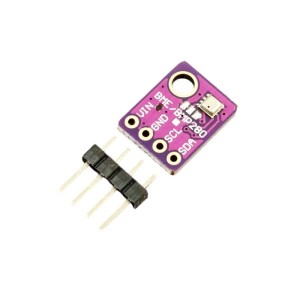
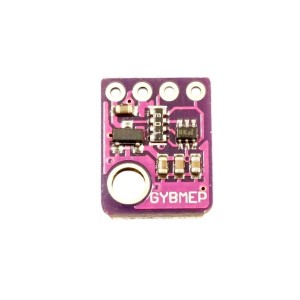
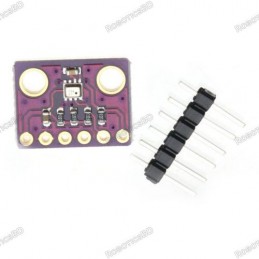
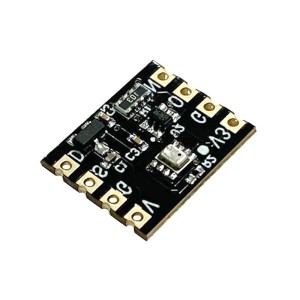
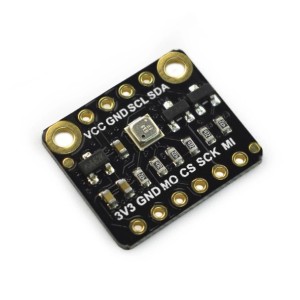
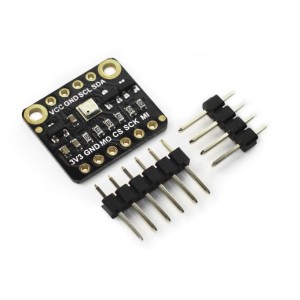
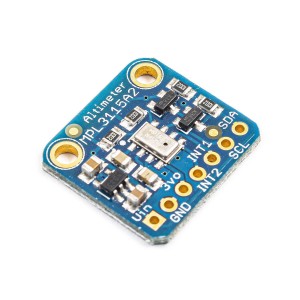
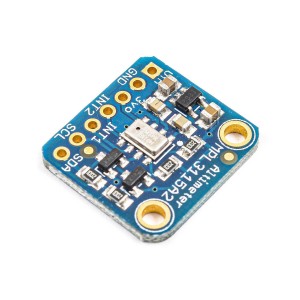
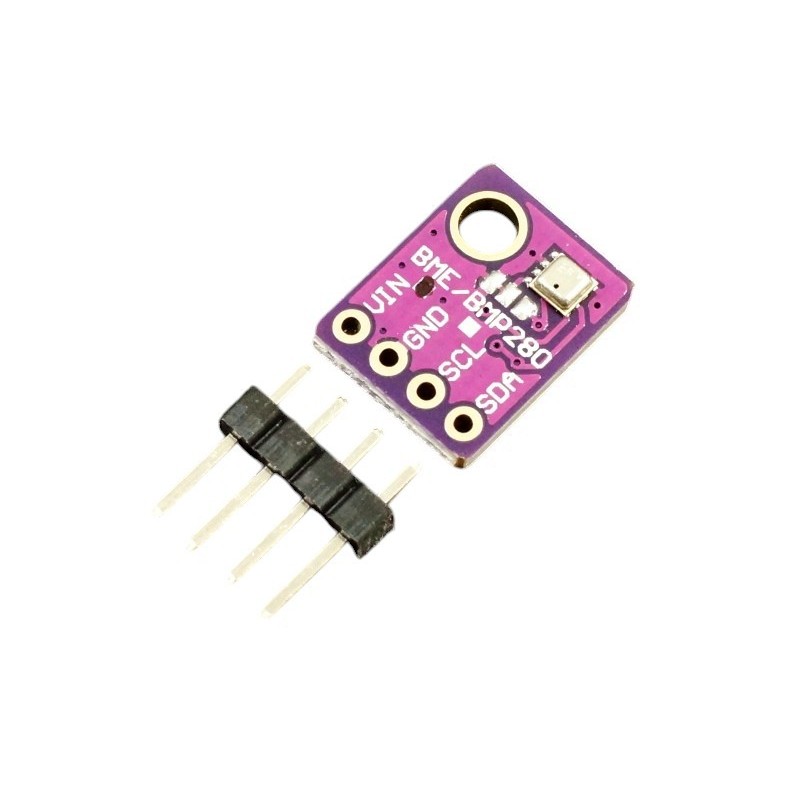
The BME280 I2C Pressure Humidity Temperature Sensor Module is a compact, high-accuracy environmental sensor based on Bosch’s advanced BME280 chip. It combines precise measurement of barometric pressure, relative humidity, and temperature in a single package, making it ideal for weather monitoring, indoor environmental tracking, and IoT-based projects. Operating on both 3.3V and 5V systems, the module includes an onboard regulator and MOSFET logic level shifters, ensuring compatibility with a wide range of microcontrollers such as Arduino, ESP8266, ESP32, and Raspberry Pi. With an I2C interface and address selection (0x76 or 0x77), it supports multiple sensors on the same bus. Offering a pressure accuracy of ±1.0hPa, humidity accuracy of ±3%, and temperature accuracy of ±1°C, the BME280 provides reliable and consistent environmental data for precise measurements and altitude estimations. Featured By RoboticsBD.
Product Images are shown for illustrative purposes only and may differ from the actual product.
RoboticsBD RoboticsBD RoboticsBD RoboticsBD RoboticsBD RoboticsBD RoboticsBD RoboticsBD RoboticsBD RoboticsBD
3-in-1 Sensor: Measures pressure, humidity, and temperature simultaneously.
Wide Measurement Range: Pressure (300–1100hPa), Humidity (0–100%), Temperature (-40°C to +85°C).
I2C Interface: Simple 4-pin connection with selectable address (0x76/0x77).
Dual Voltage Support: Operates on 3.3V or 5V systems with onboard regulator.
High Accuracy: ±1.0hPa for pressure, ±3% RH for humidity, ±1°C for temperature.
Altitude Calculation: Pressure data enables altitude measurement with ±1m accuracy.
Compact Design: Small footprint suitable for embedded and portable applications.
Reliable Build: Bosch BME280 sensor ensures long-term stability and low noise.
RoboticsBD RoboticsBD RoboticsBD RoboticsBD RoboticsBD RoboticsBD RoboticsBD RoboticsBD RoboticsBD RoboticsBD
Weather Stations: Monitor environmental changes in real-time.
IoT Devices: Ideal for smart home automation and climate tracking.
Altitude Measurement: Use for barometric altitude detection in drones or wearables.
Indoor Air Quality Monitoring: Track humidity and temperature in living spaces.
Research and Education: Perfect for environmental and sensor-based experiments.
Industrial Automation: Used in control systems requiring environmental feedback.
RoboticsBD RoboticsBD RoboticsBD RoboticsBD RoboticsBD RoboticsBD RoboticsBD RoboticsBD RoboticsBD RoboticsBD
| General Specifications | |
| Sensor Type | Bosch BME280 |
| Interface | I2C (4-pin) |
| Operating Voltage | 3.3V / 5V |
| Logic Compatibility | 3.3V and 5V |
| Pressure Range | 300 – 1100 hPa |
| Pressure Accuracy | ±1.0 hPa |
| Humidity Range | 0 – 100% RH |
| Humidity Accuracy | ±3% RH |
| Temperature Range | -40°C to +85°C |
| Temperature Accuracy | ±1.0°C (0–65°C) |
| Altitude Accuracy | ±1 meter |
| I2C Addresses | 0x76 / 0x77 (configurable) |
| Dimensions | Compact 4-pin module |
| Manufacturer | Bosch |
| Shipment Weight | 0.012 kg |
| Shipment Dimensions | 5 × 4 × 2 cm |
Please allow 5% measuring deviation due to manual measurement.
RoboticsBD RoboticsBD RoboticsBD RoboticsBD RoboticsBD RoboticsBD RoboticsBD RoboticsBD RoboticsBD RoboticsBD
The BME280 can measure temperature over the range of -40 to 80°C.
Full accuracy of ±1.0°C is obtained over the range of 0 to 65°C. Outside that range, the accuracy can decrease to ±1.5°C.
Take note of the fact that the temperature measurement is mainly used for internal temperature compensation of the other sensors. The sensor has some amount of self-heating and so the temperature measurement will usually read several degrees higher than actual temperature. If this is important for your application, you may want to compare the BME280 measured temperature against another known measurement device and apply an offset to the reading.
RoboticsBD RoboticsBD RoboticsBD RoboticsBD RoboticsBD RoboticsBD RoboticsBD RoboticsBD RoboticsBD RoboticsBD
The BME280 can measure humidity over the range of 0 to 100% with an accuracy of ±3%.
The sensor can measure up to 100% humidity over the temperature range of 0 to 60°C. At very high or low temperatures, the maximum measurable humidity decreases per the graph on page 10 of the datasheet.
RoboticsBD RoboticsBD RoboticsBD RoboticsBD RoboticsBD RoboticsBD RoboticsBD RoboticsBD RoboticsBD RoboticsBD
The BME280 can measure pressure over the range of 300 to 1100 hPa with excellent accuracy of ±1.0 hPa.
Full accuracy is obtained over the temperature range of 0 to 65°C. This gives an elevation measurement accuracy of approximately ±1 meter. Outside that range the accuracy can decrease to ±1.7 hPa
RoboticsBD RoboticsBD RoboticsBD RoboticsBD RoboticsBD RoboticsBD RoboticsBD RoboticsBD RoboticsBD RoboticsBD
The BME280 does not measure altitude directly, but it can be calculated using the pressure reading. Most libraries for this device include altitude calculation routines.
Since the device does a very good job of measuring pressure, it can do a very good job of calculating relative altitude. If you have an altitude reading with the device sitting on a table and then move it to the floor, it will show a 2 foot decrease in altitude.
If on the other hand you are trying to measure absolute altitude, such as the altitude of your table relative to sea level, things get more complicated. Since altitude is relative to sea level the device needs to know the current air pressure corrected to sea level so that it has a reference by which to calculate the altitude given the air pressure that it is currently reading.
You can get somewhat close by finding the reported air pressure from a local airport or weather service on-line which are corrected for sea level. In our example program down below, you would enter this value in the SEA_LEVEL_PRESSURE constant. In our example, we have 1013.25 loaded which is a typical reading.
Since the air pressure is constantly changing based on time, location and weather conditions, unless you have an accurate barometer corrected to sea level with you to reference, it will be difficult to get closer than 20-30 feet.
If you know the altitude that the sensor is at, you can also back into a reading by modifying the SEA_LEVEL_PRESSURE constant to give you the correct altitude reading. This might be useful if you want to make absolute measurements based on your current elevation, such as sending a rocket up into the air.
RoboticsBD RoboticsBD RoboticsBD RoboticsBD RoboticsBD RoboticsBD RoboticsBD RoboticsBD RoboticsBD RoboticsBD
The I2C interface provides MOSFET logic level shifters for use with either 3.3V or 5V MCUs.
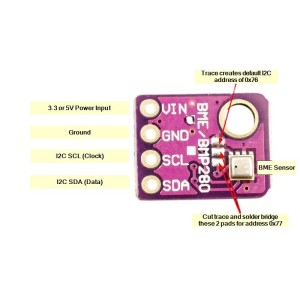
The module supports two different I2C addresses, either 0x76 or 0x77 which allows up to 2 sensors to be used on the same bus. As shipped, a trace between pads on the board next to the BME280 chip grounds the SDO pin on the BME280 chip which pulls SDO low so 0x76 is the default address . If it is desired to change the I2C address, cut the trace connecting the two pads and solder short the other two pads which pulls the SDO pin high for address 0x77.
The SCL and SDA pins connect to the SCL and SDA pins on the MCU.
RoboticsBD RoboticsBD RoboticsBD RoboticsBD RoboticsBD RoboticsBD RoboticsBD RoboticsBD RoboticsBD RoboticsBD
The module brings out the following connections.
1 x 4 Header
RoboticsBD RoboticsBD RoboticsBD RoboticsBD RoboticsBD RoboticsBD RoboticsBD RoboticsBD RoboticsBD RoboticsBD
The module ships with the male header strip loose. The header can be soldered to the top or bottom of the module depending on the planned use or wires can be used to make the connections.
For breadboard use, we put the headers on the bottom. Soldering is easiest if the header is inserted into a solderless breadboard to hold it in position during the soldering process.
RoboticsBD RoboticsBD RoboticsBD RoboticsBD RoboticsBD RoboticsBD RoboticsBD RoboticsBD RoboticsBD RoboticsBD
These are nice little assemblies with good build quality.BME280 Test Output
The program below is a simple test program which prints the data from the sensor to the Serial Monitor Window.
A similar program that displays the same information on a 4 x 20 LCD to create a mini weather station can be found on the GY-BME280 page.
There are many libraries for the BME280 sensor. In the example here, we are using the Adafruit libraries. Note that the Adafruit_sensor library will need to be manually downloaded from this link: https://github.com/adafruit/Adafruit_Sensor
The other libraries can be downloaded via the IDE library manager.
Just connect VIN to 5V or 3.3V to match the MCU and connect GND to ground. Also connect SCL to SCL on MCU and SDA to SDA on MCU.
Download the program and open the Serial Monitor Window to see the results. Ensure the baud rate is set to 9600.

RoboticsBD RoboticsBD RoboticsBD RoboticsBD RoboticsBD RoboticsBD RoboticsBD RoboticsBD RoboticsBD RoboticsBD
/*
   BME280 Test Program

   Connect I2C interface to BME280
        SCL connects to A5 or dedicated SCL pin
        SDA connects to A4 or dedicated SDA pin
   Connect BME280 Vcc to 3.3 or 5V and GND to ground
   Need to install library Adafruit_BME280
   Need to manually install library Adafruit_Sensor
*/
#include <Adafruit_Sensor.h>
#include <Adafruit_BME280.h>
#include <Wire.h>

float temperature;
float humidity;
float pressure;
float altitude;

float const ALTITUDE = 81.0;              // Altitude at my location in meters
float const SEA_LEVEL_PRESSURE = 1013.25; // Pressure at sea level

Adafruit_BME280 bme; // I2C

//===============================================================================
//  Initialization
//===============================================================================
void setup(void) {

  Serial.begin(9600);
  Serial.println("Reading sensor");

  bool status;

  // default settings
  status = bme.begin(0x76);  // The I2C address of the sensor is 0x76
  if (!status) {             // Loop if sensor not found
    Serial.print("Error. Check Connections");
    while (1);
  }
}
//===============================================================================
//  Main
//===============================================================================
void loop() {

  getPressure();   // Get sensor data and print to serial monitor window
  getHumidity();
  getTemperature();
  getAltitude();

  delay(2000);     // Update readings every 2 seconds
}
//===============================================================================
//  getTemperature - Subroutine to get and print temperature
//===============================================================================
void getTemperature()
{
  temperature = bme.readTemperature();
  temperature = temperature * 9 / 5 + 32; // Convert C to F
  String temperatureString = String(temperature, 1); // One decimal position
  Serial.print("Temperature: ");
  Serial.print(temperatureString);
  Serial.println("F");
}
//===============================================================================
//  getHumidity - Subroutine to get and print humidity
//===============================================================================
void getHumidity()
{
  humidity = bme.readHumidity();
  String humidityString = String(humidity, 0);
  Serial.print("Humidity: ");
  Serial.print(humidityString);
  Serial.println("%");
}
//===============================================================================
//  getPressure - Subroutine to get and print pressure
//===============================================================================
void getPressure()
{
  pressure = bme.readPressure();
  pressure = bme.seaLevelForAltitude(ALTITUDE, pressure);
  pressure = pressure / 3386.39;    // Convert hPa to in/Hg
  String pressureString = String(pressure, 2);
  Serial.print("Pressure: ");
  Serial.print(pressureString);
  Serial.println("in");
}
//===============================================================================
//  getAltitude - Subroutine to get and print temperature
//===============================================================================
void getAltitude()
{
  altitude = bme.readAltitude(SEA_LEVEL_PRESSURE);
  altitude = altitude * 3.28084;  // Convert meters to feet
  String altitudeString = String(altitude, 0);
  Serial.print("Altitude: ");
  Serial.print(altitudeString);
  Serial.println("ft");
}
RoboticsBD RoboticsBD RoboticsBD RoboticsBD RoboticsBD RoboticsBD RoboticsBD RoboticsBD RoboticsBD RoboticsBD
1 x BME280 I2C Pressure Humidity Temperature Sensor Module
RoboticsBD RoboticsBD RoboticsBD RoboticsBD RoboticsBD RoboticsBD RoboticsBD RoboticsBD RoboticsBD RoboticsBD
RoboticsBD RoboticsBD RoboticsBD RoboticsBD RoboticsBD RoboticsBD RoboticsBD RoboticsBD RoboticsBD RoboticsBD
Specific References
Your review appreciation cannot be sent
Report comment
Report sent
Your report cannot be sent
Write your review
Review sent
Your review cannot be sent
Reference: RBD-0687
Reference: RBD-3091
Brand: DFRobot
Reference: RBD-2964
Reference: RBD-3669
Brand: DFRobot
Reference: RBD-3839
Reference: RBD-3519
Reference: RBD-1376
Reference: RBD-4092
Reference: RBD-2983
Reference: RBD-2963
Reference: RBD-3944
Brand: DFRobot
Reference: RBD-4013
Brand: Waveshare
Reference: RBD-3667
Brand: DFRobot
Reference: RBD-2966
Reference: RBD-1854
Reference: RBD-3339
Reference: 0245
Reference: RBD-0120
Reference: RBD-0133
Reference: RBD-0145
Reference: RBD-0652
Reference: RBD-0768
Reference: RBD-1714
Reference: RBD-2266
Reference: RBD-3264
Reference: RBD-3265
Reference: RBD-3266
Reference: RBD-3267
check_circle
check_circle